Detail View Customization
🏷️ Custom View Labels
Override the labels displayed in the sidebar menu, the "Add" button, and the detail page title/breadcrumb.
| Attribute | Type | Default | Description |
|---|---|---|---|
menu_label | str | None | None | Override the sidebar menu label. Defaults to model._meta.verbose_name_plural |
add_label | str | None | None | Override the "Add" button and "Add" page title (e.g., "Add Product") |
change_label | str | None | None | Override the detail/change page title. Defaults to the object's __str__ representation |
Each attribute has a corresponding method for dynamic override:
get_menu_label() -> strget_add_label(request, object_id) -> str | Noneget_change_label(request, object_id) -> str | None
@admin.register(Product, site=sb_admin_site)
class ProductSBAdmin(SBAdmin):
    model = Product
    menu_label = "Product Catalog"    # Sidebar shows "Product Catalog" instead of "Products"
    add_label = "Product"             # "Add" button shows "Add Product"
    change_label = "Edit Product"     # Detail page title shows "Edit Product" instead of the object name
For dynamic labels based on the object being edited, override the method:
@admin.register(Product, site=sb_admin_site)
class ProductSBAdmin(SBAdmin):
    model = Product

    def get_change_label(self, request, object_id=None):
        """Show product SKU in the detail page title."""
        if object_id:
            try:
                product = Product.objects.only("sku").get(pk=object_id)
                return f"Edit {product.sku}"
            except Product.DoesNotExist:
                pass
        return self.change_label
⏮️ Previous / Next Navigation
Enable previous/next navigation buttons on the detail (change) page to quickly move between records without returning to the list view.
@admin.register(Product, site=sb_admin_site)
class ProductSBAdmin(SBAdmin):
    model = Product
    sbadmin_previous_next_buttons_enabled = True  # Show prev/next buttons on detail page
| Attribute | Type | Default | Description |
|---|---|---|---|
sbadmin_previous_next_buttons_enabled | bool | False | When True, previous and next navigation buttons appear on the detail/change page. The ordering respects the current list view's sort and filter state. |
🗑️ Custom Delete Confirmation Template
Override the template rendered when a user clicks "Delete" on a single object. This is useful when you need a custom confirmation page — for example, to display additional warnings, require extra input, or show a summary of side effects before deletion.
| Attribute | Type | Default | Description |
|---|---|---|---|
delete_confirmation_template | str | "sb_admin/actions/delete_confirmation.html" | Template used for the single-object delete confirmation page |
@admin.register(Product, site=sb_admin_site)
class ProductSBAdmin(SBAdmin):
    model = Product
    delete_confirmation_template = "catalog/custom_delete_confirmation.html"
The custom template should extend the base SBAdmin template and can use the following context variables:
| Variable | Description |
|---|---|
object | The object being deleted |
object_name | Display name of the model |
deleted_objects | Nested list of related objects that will also be deleted |
model_count | List of (model_name, count) tuples summarizing affected objects |
perms_lacking | List of object types the user lacks permission to delete |
protected | List of protected related objects that prevent deletion |
For customizing the bulk delete confirmation page (when deleting multiple objects from the list view), use delete_selected_confirmation_template instead.
🧩 Fieldset Layout Classes
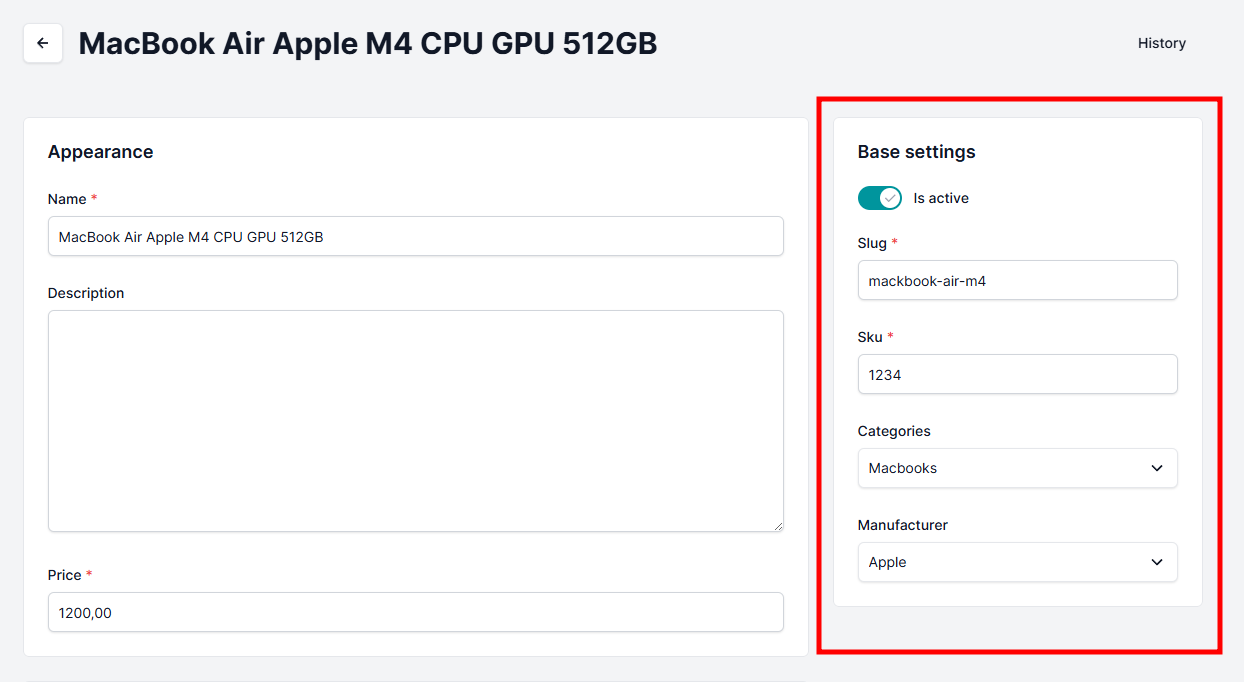
SmartBase Admin supports additional customization of fieldset layout in detail views using the classes option.
Django SmartBase Admin currently supports two layout classes:
| Class | Import | Description |
|---|---|---|
DETAIL_STRUCTURE_RIGHT_CLASS | from django_smartbase_admin.engine.const import DETAIL_STRUCTURE_RIGHT_CLASS | Aligns the fieldset to the right panel in the detail view layout (two-column: left and right). Useful for grouping meta fields, status fields, or supplementary info. |
FIELDSET_HIDE_HEADER_CLASS | from django_smartbase_admin.engine.const import FIELDSET_HIDE_HEADER_CLASS | Hides the fieldset header (title). Useful when you want to group fields without showing a section label. |
💡Example: Defining class for Base setting fieldset
- Code
- Result
from django_smartbase_admin.engine.const import DETAIL_STRUCTURE_RIGHT_CLASS, FIELDSET_HIDE_HEADER_CLASS

@admin.register(Product, site=sb_admin_site)
class ProductSBAdmin(SBAdmin):
    fieldsets = [
        (
            "Base settings",
            {
                "classes": [DETAIL_STRUCTURE_RIGHT_CLASS],  # Aligns to right panel
                "fields": [
                    "is_active",
                    "slug",
                    "sku",
                    "categories",
                    "manufacturer",
                ],
            },
        ),
        (
            "Hidden header section",
            {
                "classes": [FIELDSET_HIDE_HEADER_CLASS],  # Hides the fieldset title
                "fields": [
                    "description",
                ],
            },
        ),
    ]

    #... other fields