🌐 Translations (i18n Support)
SmartBase Admin provides built-in support for managing translations of model fields using django-parler. This includes:
- A dedicated translations management view for translating content across all translatable models
- Translation status indicators on model detail pages showing which languages are complete
- Automatic form handling for translatable model fields in admin views
- django-parler must be installed
- Your Django project must have multiple languages configured in
settings.LANGUAGES settings.LANGUAGE_CODEdefines the main (source) language
🛠️ How It Works
- Models use django-parler's
TranslatedFieldsto define which fields are translatable. - Admin classes extend
SBTranslatableAdmininstead ofSBAdmin— this automatically adds a translation status widget to the detail page. SBAdminTranslationsViewis registered as a custom view that provides a centralized translation management interface for all translatable models.
💡 Example #1: Translatable Model
Define your model with django-parler's TranslatedFields:
from django.db import models
from django.utils.translation import gettext_lazy as _
from parler.models import TranslatableModel, TranslatedFields


class Article(TranslatableModel):
    translations = TranslatedFields(
        title=models.CharField(_("Title"), max_length=200),
        body=models.TextField(_("Body"), blank=True),
    )
    slug = models.SlugField(unique=True)
    is_published = models.BooleanField(default=False, verbose_name=_("Published"))
    created = models.DateTimeField(auto_now_add=True, verbose_name=_("Created"))

    class Meta:
        verbose_name = _("Article")
        verbose_name_plural = _("Articles")

    def __str__(self):
        return self.safe_translation_getter("title", any_language=True) or f"Article {self.pk}"
💡 Example #2: SBTranslatableAdmin
Use SBTranslatableAdmin instead of SBAdmin for translatable models. This automatically:
- Adds a translation status fieldset to the detail page (showing which languages are translated)
- Uses
SBTranslatableModelFormas the form class (handles translated fields in the admin form)
from django.contrib import admin
from django.utils.translation import gettext_lazy as _

from django_smartbase_admin.admin.admin_base import SBTranslatableAdmin
from django_smartbase_admin.admin.site import sb_admin_site
from django_smartbase_admin.engine.const import DETAIL_STRUCTURE_RIGHT_CLASS
from django_smartbase_admin.engine.field import SBAdminField

from catalog.models import Article


@admin.register(Article, site=sb_admin_site)
class ArticleSBAdmin(SBTranslatableAdmin):
    model = Article
    sbadmin_list_display = (
        "title",
        "slug",
        SBAdminField(name="is_published", title=_("Published")),
        SBAdminField(name="created", title=_("Created")),
    )
    list_filter = ["is_published"]
    search_fields = ["translations__title", "slug"]
    fieldsets = [
        (
            None,
            {
                "fields": [
                    "title",
                    "body",
                ],
            },
        ),
        (
            _("Settings"),
            {
                "classes": [DETAIL_STRUCTURE_RIGHT_CLASS],
                "fields": [
                    "slug",
                    "is_published",
                ],
            },
        ),
    ]
Note how search_fields uses translations__title to search translated fields — this is the django-parler convention for querying translated content.
If you use a custom form class with SBTranslatableAdmin, it must extend SBTranslatableModelForm:
from django_smartbase_admin.admin.admin_base import SBTranslatableModelForm

class ArticleForm(SBTranslatableModelForm):
    class Meta:
        model = Article
        fields = "__all__"
Using a form that does not extend SBTranslatableModelForm will raise an ImproperlyConfigured error.
💡 Example #3: Translations Management View
Register SBAdminTranslationsView in your configuration to provide a centralized interface for managing translations across multiple models.
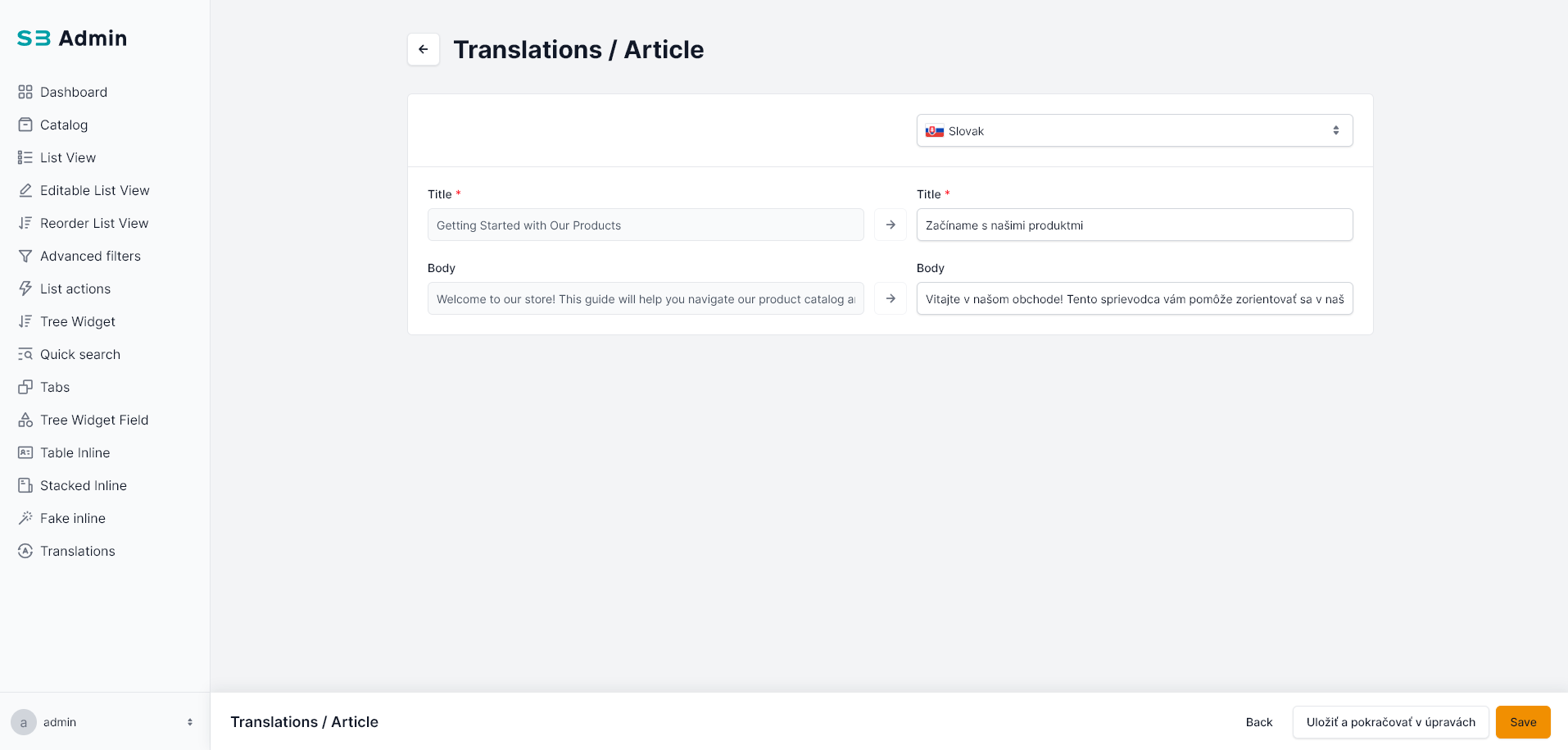
from django.conf import settings

from django_smartbase_admin.engine.configuration import SBAdminConfigurationBase, SBAdminRoleConfiguration
from django_smartbase_admin.engine.menu_item import SBAdminMenuItem
from django_smartbase_admin.views.dashboard_view import SBAdminDashboardView
from django_smartbase_admin.views.translations_view import SBAdminTranslationsView


menu_items = [
    SBAdminMenuItem(view_id="dashboard", icon="All-application"),
    SBAdminMenuItem(
        label="Catalog",
        icon="Box",
        sub_items=[
            SBAdminMenuItem(view_id="catalog_product", label="Products"),
            SBAdminMenuItem(view_id="catalog_category", label="Categories"),
            SBAdminMenuItem(view_id="catalog_article", label="Articles"),
        ],
    ),
]

registered_views = [
    SBAdminDashboardView(widgets=[], title="Dashboard"),
]

# Only add translations menu when multiple languages are configured
if len(settings.LANGUAGES) > 1:
    menu_items.append(
        SBAdminMenuItem(view_id="translations", icon="Translation")
    )
    registered_views.append(
        SBAdminTranslationsView(
            translations_definition=[
                {
                    "model_path": "catalog.Article",
                    "icon": {
                        "path": "#Ad-product",
                        "class": "bg-success-100 text-success-800",
                    },
                    "fields": ["title", "body"],  # Only these fields will be translatable
                },
            ]
        )
    )


_role_config = SBAdminRoleConfiguration(
    default_view=SBAdminMenuItem(view_id="dashboard"),
    menu_items=menu_items,
    registered_views=registered_views,
)


class SBAdminConfiguration(SBAdminConfigurationBase):
    def get_configuration_for_roles(self, user_roles):
        return _role_config
📖 translations_definition Reference
Each entry in the translations_definition list configures a translatable model:
| Key | Type | Required | Description |
|---|---|---|---|
model_path | str | ✅ | Dot-separated path to the model (e.g., "catalog.Article") |
fields | list[str] | No | List of field names to include in the translation view. If omitted, all translated fields are shown |
icon | dict | No | Icon configuration with path (SVG sprite reference like "#Ad-product") and class (CSS classes for styling) |
view_class | class | No | Custom view class (must extend ModelTranslationView). Defaults to ModelTranslationView |
description | str | No | Description text shown alongside the model in the translations overview |
📋 Translation Status on Detail Page
When using SBTranslatableAdmin, a Translations fieldset is automatically appended to the detail page. It displays the translation status for each configured language:
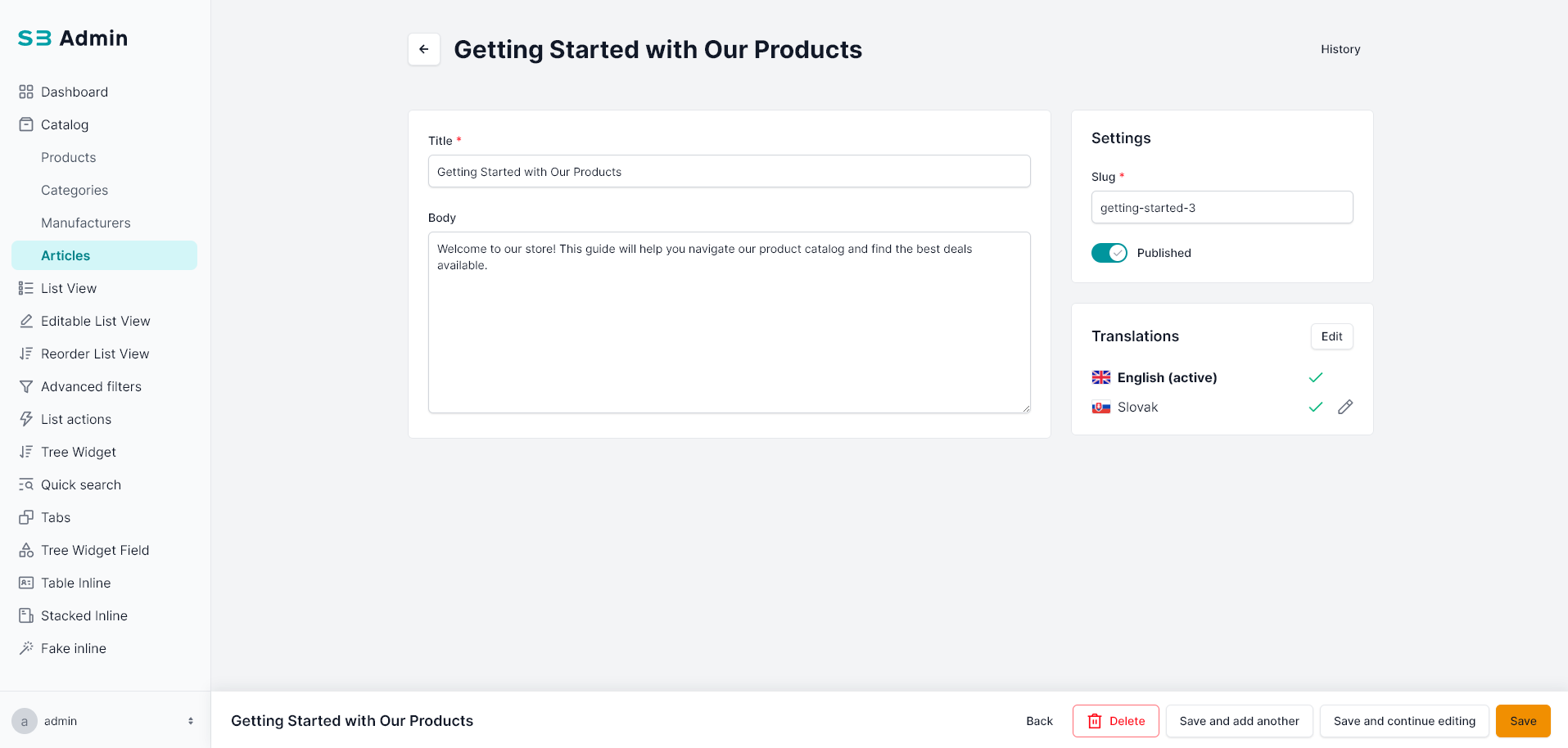
| Status | Icon | Meaning |
|---|---|---|
| ✅ Translated | Green check | All translatable fields have been filled for this language |
| ⚠️ Incomplete | Yellow warning | Some translatable fields are filled, but not all |
| ➕ Not Translated | Gray plus | No translations exist for this language |
The status widget includes edit links that navigate directly to the translations management view for the selected model and language.
⚙️ Django Settings
Ensure your Django project is configured for multiple languages:
LANGUAGE_CODE = "en"  # Main (source) language

LANGUAGES = [
    ("en", "English"),
    ("sk", "Slovak"),
]
SmartBase Admin uses settings.LANGUAGE_CODE as the main language and settings.LANGUAGES to determine available translation languages. The translations view automatically excludes the main language from the list of languages to translate into (since it's the source language).